F5 BIG-IP + Wazuh: Getting Logs Working After 18 Months
When hope was almost gone, I decided to give the F5–Wazuh integration one more try.
Its already been eighteen months since I first had the failure trying integrate it, tried more than 50 times, had nearly convinced me these two were never going to get along.
F5 BIG-IP is a good of a solutions when it comes to Web Application Firewall and Load Balancing tasks. I’ve been working with it for over half and a year now — it does its job quite well, protecting applications through real time traffic inspection and respective response enforcement. But it comes with a very real limit when it comes to local log storage at least in this series of F5 WAF which is claimed to be fixed in newer product series. On virtual editions, it caps at 3 million records or 2 GB of database space; on physical systems, it goes to 5 GB.
I often get surprised when I find people getting disappointed over F5 not storing logs for much longer time. It is a limit but not really a flaw — it is so by design. WAF’s main job is to process live traffic and respond to attacks instantly & accordingly. Storing, indexing, and searching logs is whole another world — slow, storage-hungry, and heavy on CPU. If F5 did all that itself, it would steal power from what it’s best at: stopping attacks as they happen. That’s why offloading logs & events to a SIEM is all that makes sense & that is why it is made for.
Expecting a single product to be both a WAF and a SIEM is like asking a Formula 1 car to tow a truck—technically possible, but you’ll burn the engine before the truck moves.
And that is where Wazuh comes in.
F5 does it all to guard the gate, Wazuh keeps the records. It collects logs, parses them into useful fields, stores them for months or years depends how rich you are, and even alerts you when something suspicious happens. It understands CEF, and so does F5 if you set it to ArcSight mode. On paper, this pairing looked simple.
The Eighteen-Month Standoff
The documentation looked simple enough:
- Both systems support syslog.
- Both understand CEF.
- A few settings on each side, and done.
But the reality wasn’t so generous. Find my issue here: #27392
I tried buffer tweaks, IP changes, subnet shuffles, protocol switches, even manual rsyslog in the middle, even version downgrades. Sometimes some part of logs came through fine but just chunked in half, sometimes as hex garbage, sometimes not at all. One day a config would work, the next it was dead for no reason I could find.
And the Breakthrough
And then, one day, no more drama — it just worked.
Maybe Wazuh’s updates fixed something. Maybe my setup finally clicked. Or maybe, after all that time, the stars just lined up. I’m really unknown what is that miracle that made it work this time. It was the most basic configuration I did, which I had repeated maybe dozens of times 18 months before.
Anyways, moving onwards with the newly-wed couples.
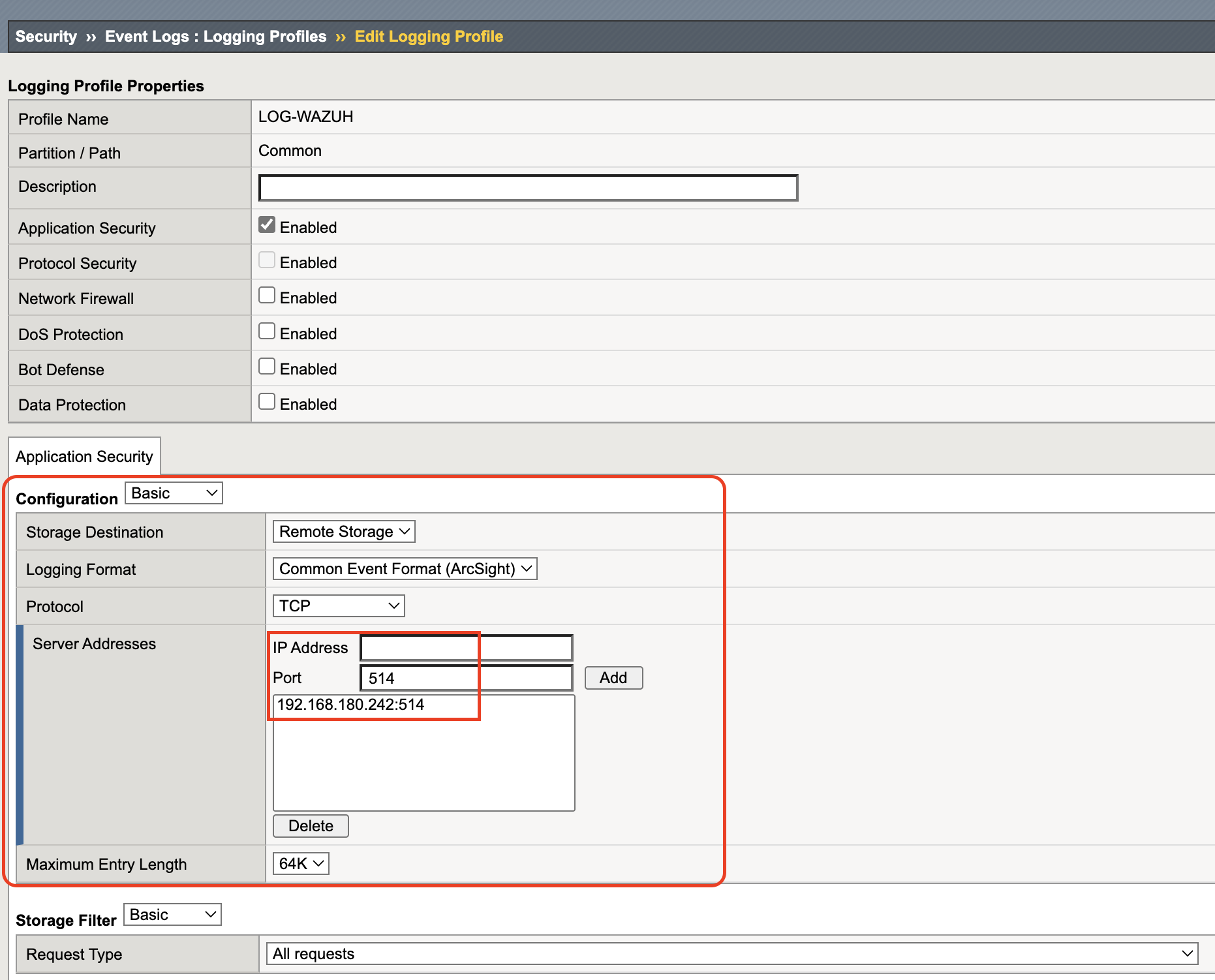
Step 1 – Create the F5 Logging Profile
In F5:
- Go to Security → Event Logs → Logging Profiles
- Give it a name
- Select the category to log (for me:
Application Security) - Check Storage Destination → Remote Storage
- Use TCP protocol for bigger payloads
- Add your Wazuh receiver’s IP and listening port
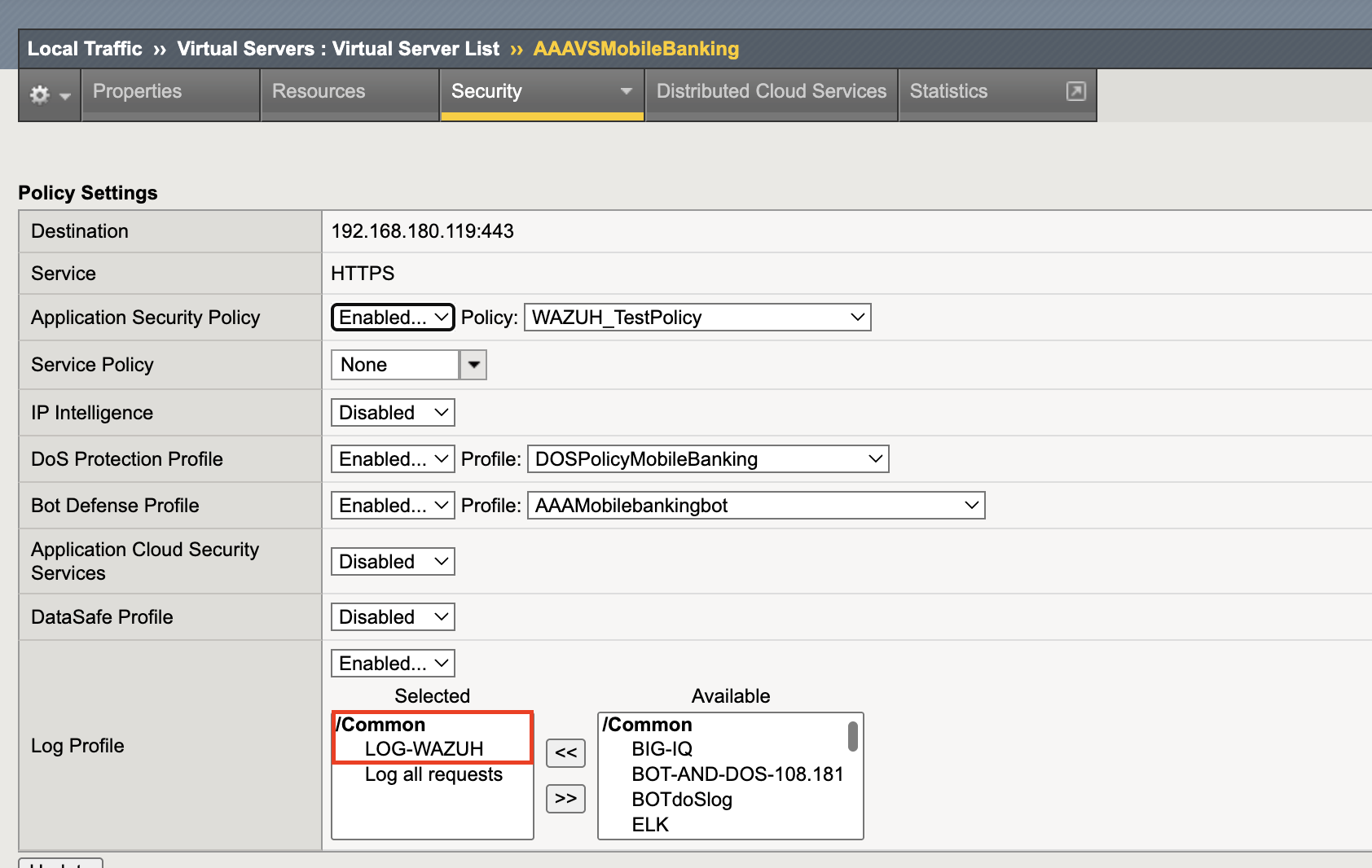
Step 2 – Attach to Virtual Server
In Local Traffic → Virtual Servers, pick your target server.
Attach the LOG-WAZUH profile under Security → Policies.
That’s what makes the logs actually leave F5.
Step 3 – Configure Wazuh
In ossec.conf, allow the IP that F5 uses to send logs.
That IP is the external self IP on F5.
To find it:
- Go to Network → Self-IPs → External Self IPs
- Or in the F5 CLI:
|
|
The output shows the sending IP — use that in Wazuh’s config.
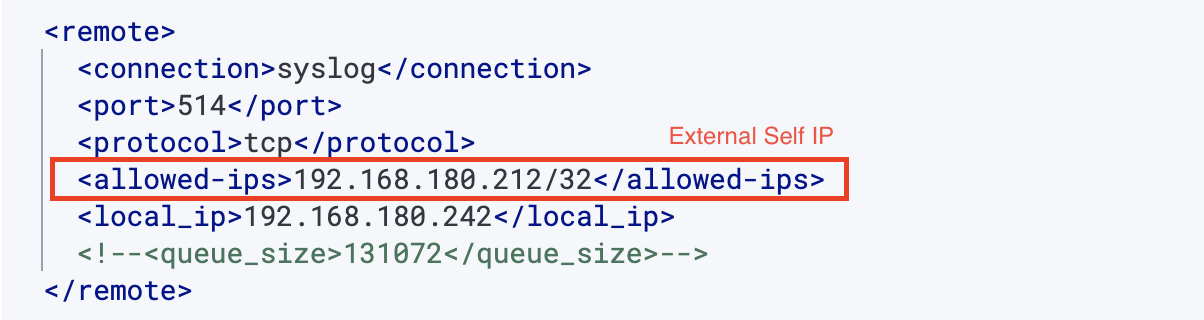
Restart Wazuh, and it’s ready to receive logs.
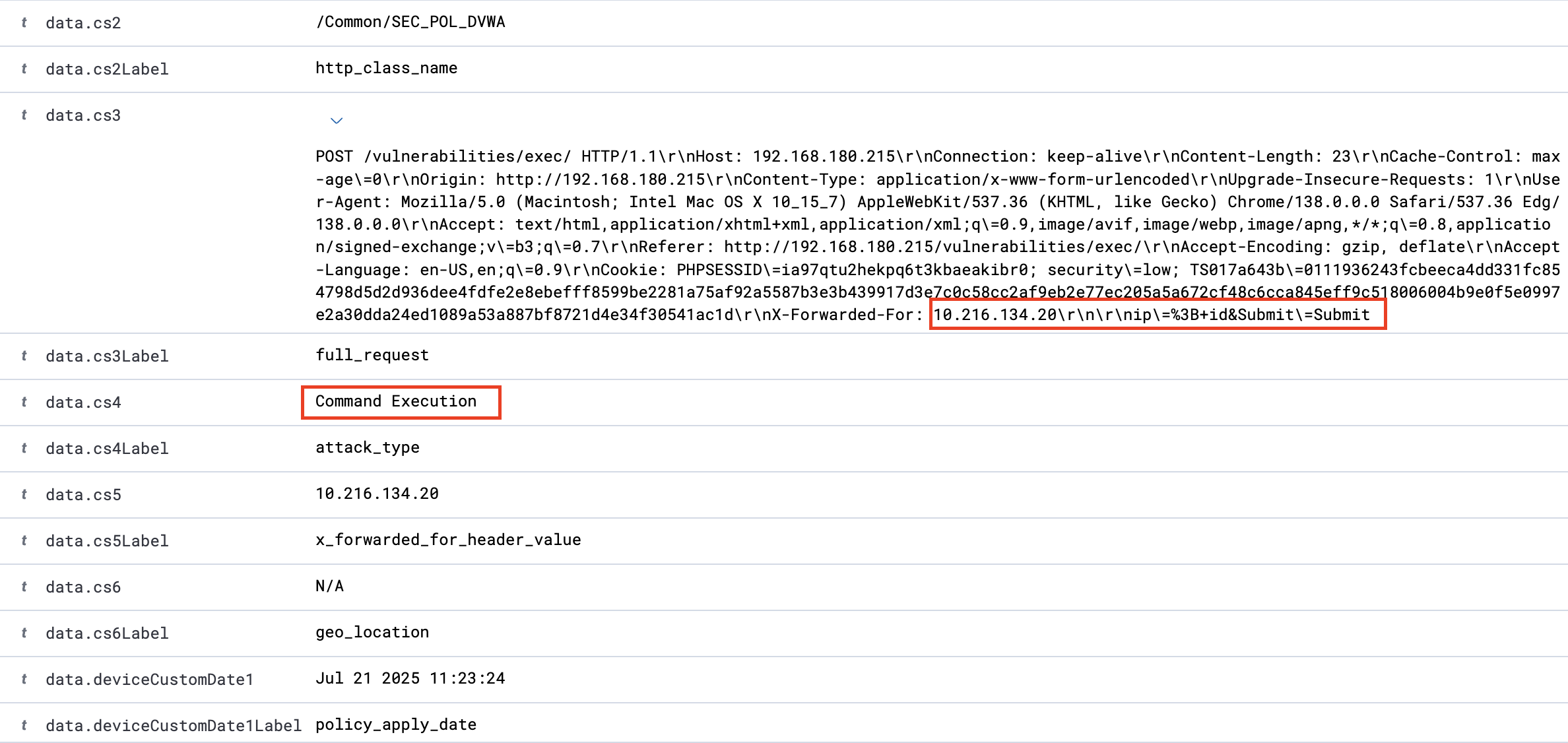
Seeing the results
I opened the Wazuh dashboard — and there they were. Clean, parsed CEF logs from F5, showing (fields are yet to have their naming ceremony, never mind):

After eighteen months of silence, they were finally speaking.
Then I hit my DVWA with some test payloads.
XSS it a bit

Command Injection

An alternative path
For high-volume production environments, F5 offers High Speed Logging (HSL) which is faster and more flexible than standard syslog. That’s a bigger story for another time; detailed guidance lives here: Remote HSL for F5 BIG-IP.
And the Lessons from the Journey
Just grace actually, but to know a thing is; each tool sticks to what it does best:
- F5 – live traffic analysis and blocking
- Wazuh – storing, indexing, and digging through logs later
Now, logs flow from F5 to Wazuh in real time. I can check months of history without worrying about F5’s storage limits.
As I write this, logs keep coming in, each one like a little postcard from F5 saying, “I caught something. Thought you should know.”
It took eighteen months for them to talk. But now they do.
Maybe it was an update, maybe a coincidence, at least my ego is not letting I was mistaken as I’ve almost given 1 month trying all the ways I could — or maybe machines just have their moods too.
Nothing mystical about it, but after enough retries, even logic seems to respond better when you stop arguing with it.
This time, it simply worked. And that was enough.
- Be a part of Wazuh Ambassadors Program, if you believe you’re a good fit: https://wazuh.com/ambassadors-program/